
Coupon stacking rules tell you whether particular discounts can be used together on a qualifying purchase. Start with the store's current policy and each offer's terms, then inspect the final checkout. Two available coupons do not necessarily form a permitted combination. A paper coupon and an app coupon can also represent the same kind of offer rather than two independent savings.
Use this guide to organise a purchase you already intend to make. The worksheet and calculator illustrate different calculation orders; they cannot approve a coupon, predict a register's decision or establish a retailer's policy. All numerical examples are fictional, and no codes in this guide are live offers.
Identify the offers before adding them
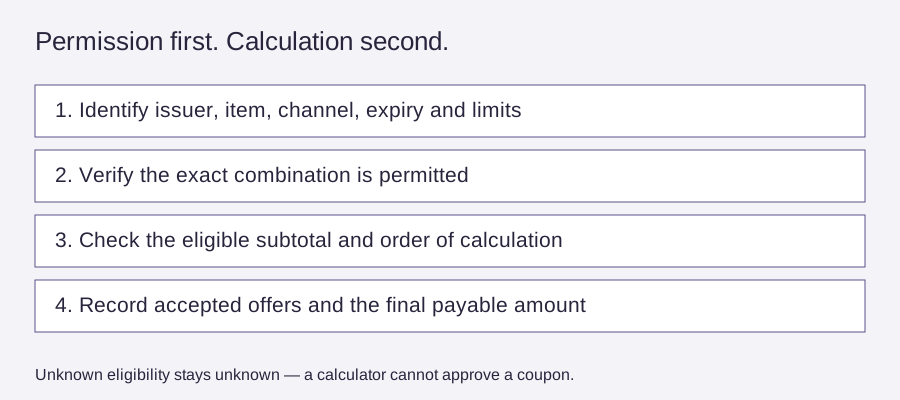
Write down who issued each offer, where it can be redeemed, the qualifying item or category, any minimum purchase, its expiry and the stated combination restrictions. Keep a sale price, a product coupon, an order discount, a shipping offer and a later reward in separate rows. Combining unlike labels in your head makes it easy to count the same saving twice.
Do not treat “digital” as a separate coupon category on its own. It describes how an offer is delivered. Check the actual issuer and terms. Likewise, a reward earned after checkout is not automatically money removed from today's bill. Record when it becomes available, what it can buy and any conditions before assigning it value.
For a manufacturer coupon, read the product, size, quantity and use limits exactly as printed. For a store promotion, check whether it applies online, in an app or in a particular store. If an offer's status or origin is unclear, leave the combination unresolved and ask the retailer. Do not scan extra copies, alter coupons or create additional accounts to bypass a limit.
A platform example is not a universal store rule
Shopify's official discount-combination documentation distinguishes product, order and shipping discounts. It explains that combination settings and eligibility affect which offers work together, and that different discount classes have a calculation order. That is evidence that checkout configuration matters; it does not tell you that any particular shop accepts your coupons.
The same documentation also describes a case where multiple percentage order discounts use the original subtotal. Do not assume every pair of percentage discounts compounds sequentially. This guide deliberately avoids a universal stacking formula. Our small calculator compares one percentage discount with one fixed discount under two explicitly selected hypothetical sequences.
Check eligibility before doing the arithmetic
A minimum-spend condition needs its own line in the record. Does it refer to eligible products, the order subtotal or another defined amount? Which discounts affect that amount? Do excluded items count? If the terms do not answer those questions, do not use the largest possible interpretation to justify an extra purchase.
Check the same basket for every comparison. Changing the product, quantity or seller while switching codes is no longer a like-for-like test. Keep shipping, tax and any service charge visible. A discount that looks larger before delivery may still produce a higher final bill.
For broad sale preparation, use what to price-check before a big sale. That guide covers your baseline and purchase list; this one focuses on combination restrictions and the order of calculation.
Compare two hypothetical calculation orders
Open the coupon calculation worksheet. Enter a single eligible pre-tax subtotal, one percentage and one fixed-dollar reduction. The tool shows percentage-then-fixed and fixed-then-percentage totals, rounding the percentage result to the nearest cent at that step. It floors a goods subtotal at zero. Your store may use other rules, so use its actual checkout as the final record.
For a fictional $50 eligible subtotal, 20% and $5 off, percentage first gives $40 followed by $35. Fixed first gives $45 followed by $36. Those totals differ by $1 even though the visible discount labels match. Neither sequence is a promise that the two offers are permitted together.
The tool also shows each discount alone. A 0% or $0 input is useful as a mathematical baseline, not a claim that a store issues or accepts such a code. A fixed reduction larger than the subtotal does not create cash back in this model. It simply leaves the goods subtotal at zero.
Record what the checkout actually accepted
Once the store's terms permit a comparison, note the exact goods subtotal, accepted discounts, shipping, tax and final payable amount. If one code replaces another, record the accepted result rather than adding both advertised values. If an automatic promotion changes, check the line items again before choosing an option.
Do not assume a checkout rejection proves the site is broken. The basket may contain excluded items, the minimum may be calculated differently, or a code may be limited to a customer group or channel. Recheck the terms once and ask the store when necessary. Stop before payment if the total is not clear.
The printable record has separate rows for policy source, date checked, qualifying goods, combination restriction, calculation base and confirmed payable amount. Keep those notes concise enough that you can reconstruct your decision later without storing payment details. The tool does not store or transmit your entries; reloading clears them.
Keep later rewards outside today's saving
A future reward may expire, require another purchase or apply only to selected products. Treat it as a separate possible benefit until its terms and a real future need are clear. Do not subtract an advertised future reward from the amount leaving your account today and call the result your checkout total.
If you are comparing a subscription or repeat delivery, use the Amazon coupon-page checklist for that separate shopping route. Do not carry a first-order incentive into every future order unless the current terms actually say it continues.
Stop when the basket no longer serves the need
A workable stack still has to be a sensible purchase. Check quantities, storage, expected use and return arrangements. Adding an unwanted item to unlock a combination can turn a good price on one product into a larger bill overall. Compare against buying only the needed items through a clear, permitted offer.
Keep the useful result as a verified checkout record, not a reusable promise about the store. Policies, offers and eligibility can change. The next purchase deserves a fresh look at the current terms, even when the same discount labels appear again.